When you are accustomed to Wireshark’s filtering system and know what labels you wish to use in your filters it can be very quick to simply type a filter string. However, if you are new to Wireshark or are working with a slightly unfamiliar protocol it can be very confusing to try to figure out what to type. The “Display Filter Expression” dialog box helps with this.
![[Tip]](images/tip.svg) | Tip |
|---|---|
|
The “Display Filter Expression” dialog box is an excellent way to learn how to write Wireshark display filter strings. |
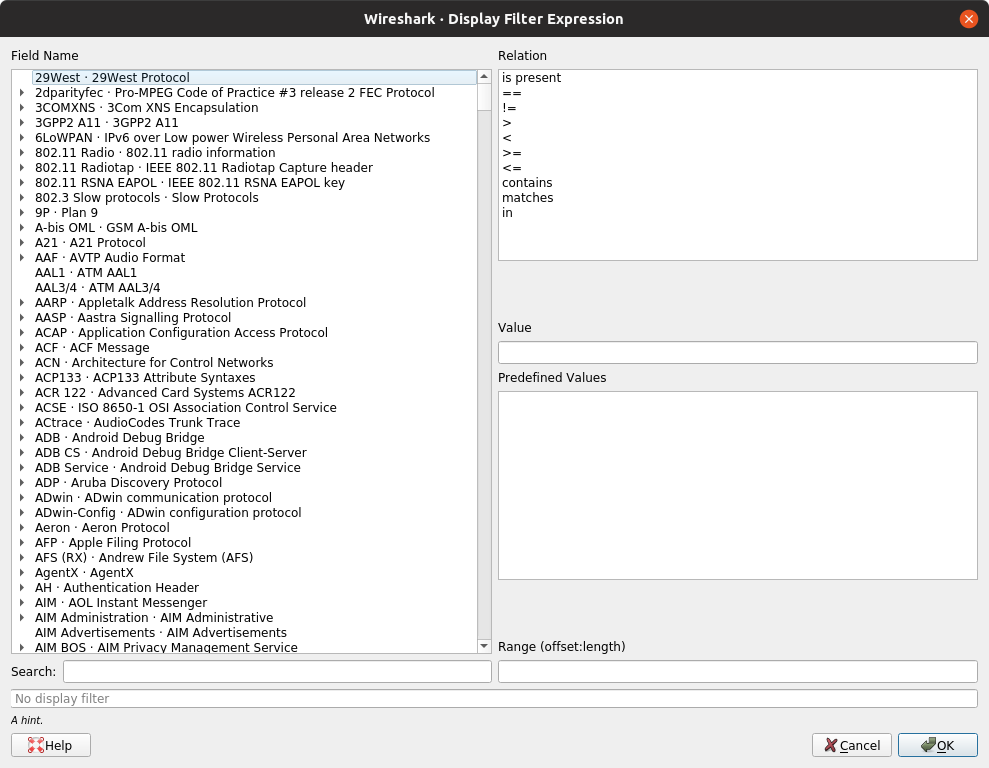
When you first bring up the Display Filter Expression dialog box you are shown a tree of field names, organized by protocol, and a box for selecting a relation.
- Field Name
- Select a protocol field from the protocol field tree. Every protocol with filterable fields is listed at the top level. You can search for a particular protocol entry by entering the first few letters of the protocol name. By expanding a protocol name you can get a list of the field names available for filtering for that protocol.
- Relation
-
Select a relation from the list of available relation. The is present is a unary relation which is true if the selected field is present in a packet. All other listed relations are binary relations which require additional data (e.g. a Value to match) to complete.
When you select a field from the field name list and select a binary relation (such as the equality relation,
==) you will be given the opportunity to enter a value, and possibly some range information. - Value
- You may enter an appropriate value in the Value text box. The Value will also indicate the type of value for the Field Name you have selected (like character string).
- Predefined Values
- Some of the protocol fields have predefined values available, much like enumerations in C. If the selected protocol field has such values defined, you can choose one of them here.
- Search
-
Lets you search for a full or partial field name or description.
Regular expressions are supported.
For example, searching for
tcp.*flagshows the TCP flags fields supported by a wide variety of dissectors, while^tcp.flagshows only the TCP flags fields supported by the TCP dissector. - Range
-
A range of integers or a group of ranges, such as
1-12or39-42,98-2000. - Opens this section of the User’s Guide.
- When you have built a satisfactory expression click and a filter string will be built for you.
- You can leave the “Add Expression…” dialog box without any effect by clicking the button.