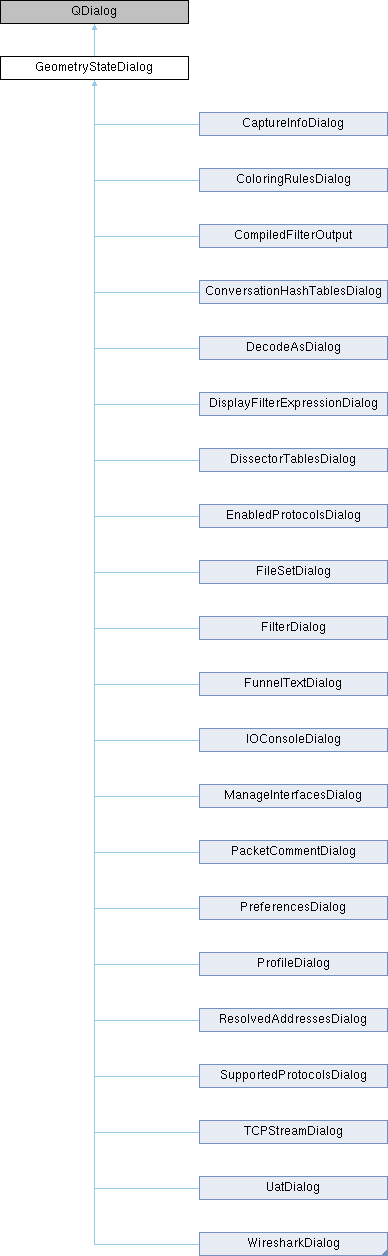
A dialog that remembers its geometry and splitter state.
More...
#include <geometry_state_dialog.h>
|
| | GeometryStateDialog (QWidget *parent, Qt::WindowFlags f=Qt::Window) |
| | Constructs a new GeometryStateDialog with the specified parent and window flags.
|
|
| ~GeometryStateDialog () |
| | Save the geometry and splitter state and then destroy the GeometryStateDialog.
|
| void | setWindowModality (Qt::WindowModality windowModality) |
| | Sets the window modality for the dialog. On non-macOS platforms, this also sets the parent to ensure modal dialogs are always on top of their parent.
|
|
| void | loadGeometry (int width=0, int height=0, const QString &dialog_name=QString()) |
| | Loads the geometry and splitter state for the dialog.
|
| void | loadSplitterState (QSplitter *splitter=nullptr) |
| | Loads the state of a splitter for the dialog.
|
A dialog that remembers its geometry and splitter state.
◆ GeometryStateDialog()
| GeometryStateDialog::GeometryStateDialog |
( |
QWidget * | parent, |
|
|
Qt::WindowFlags | f = Qt::Window ) |
|
inlineexplicit |
Constructs a new GeometryStateDialog with the specified parent and window flags.
- Parameters
-
| parent | The parent widget for the dialog. |
| f | The window flags for the dialog, defaulting to Qt::Window. On macOS, the parent is set to ensure the dialog behaves as an independent window that un-maximizes correctly. On other platforms, the parent is set to NULL to allow for independent window behavior. The Qt::Window flag is used to provide minimize and maximize buttons, as this dialog is intended to remember user-set geometry. |
◆ loadGeometry()
| void GeometryStateDialog::loadGeometry |
( |
int | width = 0, |
|
|
int | height = 0, |
|
|
const QString & | dialog_name = QString() ) |
|
protected |
Loads the geometry and splitter state for the dialog.
- Parameters
-
| width | The initial width for the dialog. |
| height | The initial height for the dialog. |
| dialog_name | The name of the dialog for saving/loading geometry. |
◆ loadSplitterState()
| void GeometryStateDialog::loadSplitterState |
( |
QSplitter * | splitter = nullptr | ) |
|
|
protected |
Loads the state of a splitter for the dialog.
- Parameters
-
| splitter | The splitter for which to load the state. |
◆ setWindowModality()
| void GeometryStateDialog::setWindowModality |
( |
Qt::WindowModality | windowModality | ) |
|
Sets the window modality for the dialog. On non-macOS platforms, this also sets the parent to ensure modal dialogs are always on top of their parent.
- Parameters
-
| windowModality | The desired window modality (e.g., Qt::ApplicationModal, Qt::WindowModal, Qt::NonModal). |
The documentation for this class was generated from the following files:
- /builds/wireshark/wireshark/ui/qt/geometry_state_dialog.h
- /builds/wireshark/wireshark/ui/qt/geometry_state_dialog.cpp

 1.15.0