By default, Wireshark’s TCP dissector tracks the state of each TCP session and provides additional information when problems or potential problems are detected. Analysis is done once for each TCP packet when a capture file is first opened. Packets are processed in the order in which they appear in the packet list. You can enable or disable this feature via the “Analyze TCP sequence numbers” TCP dissector preference.
For analysis of data or protocols layered on top of TCP (such as HTTP), see Section 7.8.3, “TCP Reassembly”.
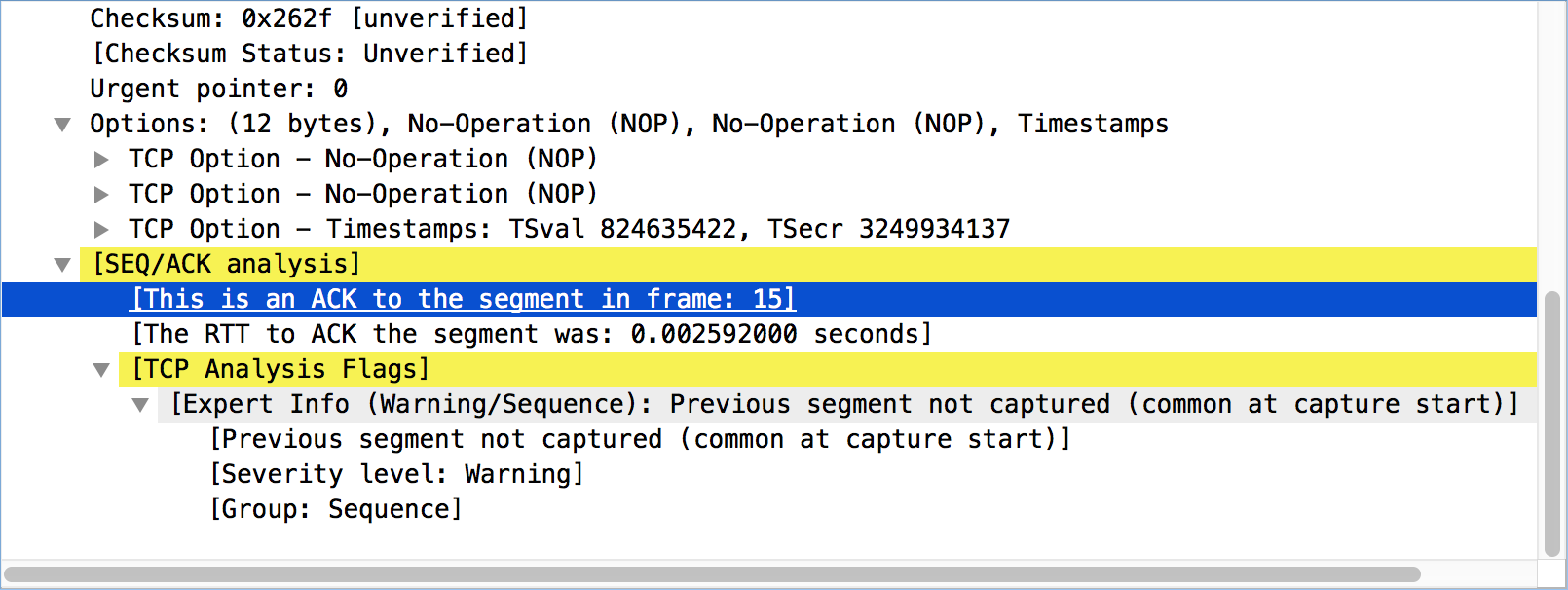
TCP Analysis flags are added to the TCP protocol tree under “SEQ/ACK analysis”. Each flag is described below. Terms such as “next expected sequence number” and “next expected acknowledgment number” refer to the following:
- Next expected sequence number
- The last-seen sequence number plus segment length. Set when there are no analysis flags and for zero window probes. This is initially zero and calculated based on the previous packet in the same TCP flow. Note that this may not be the same as the tcp.nxtseq protocol field.
- Next expected acknowledgment number
- The last-seen sequence number for segments. Set when there are no analysis flags and for zero window probes.
- Last-seen acknowledgment number
- Always updated for each packet. Note that this is not the same as the next expected acknowledgment number.
TCP ACKed unseen segment
Set when the expected next acknowledgment number is set for the reverse direction and it’s less than the current acknowledgment number.
TCP Dup ACK <frame>#<acknowledgment number>
Set when all of the following are true:
- The segment size is zero.
- The window size is non-zero and hasn’t changed, or there is valid SACK data.
- The next expected sequence number and last-seen acknowledgment number are non-zero (i.e., the connection has been established).
- SYN, FIN, and RST are not set.
TCP Fast Retransmission
Set when all of the following are true:
- This is not a keepalive packet.
- In the forward direction, the segment size is greater than zero or the SYN or FIN is set.
- The next expected sequence number is greater than the current sequence number.
- We have at least two duplicate ACKs in the reverse direction, or more than 2 MSS have been jumped over
- The current sequence number equals the next expected acknowledgment number.
- We saw the last acknowledgment less than 20ms ago.
Supersedes “Out-Of-Order” and “Retransmission”.
TCP Keep-Alive
Set when the segment size is zero or one, the current sequence number is one byte less than the next expected sequence number, and none of SYN, FIN, or RST are set.
Supersedes “Fast Retransmission”, “Out-Of-Order”, “Spurious Retransmission”, and “Retransmission”.
TCP Keep-Alive ACK
Set when all of the following are true:
- The segment size is zero.
- The window size is non-zero and hasn’t changed.
- The current sequence number is the same as the next expected sequence number.
- The current acknowledgment number is the same as the last-seen acknowledgment number.
- The most recently seen packet in the reverse direction was a keepalive.
- The packet is not a SYN, FIN, or RST.
Supersedes “Dup ACK” and “ZeroWindowProbeAck”.
TCP Out-Of-Order
Set when all of the following are true:
- This is not a keepalive packet.
- In the forward direction, the segment length is greater than zero or the SYN or FIN is set.
- The next expected sequence number is greater than the current sequence number.
- The next expected sequence number and the next sequence number differ.
- The last segment arrived within the Out-Of-Order RTT threshold. The threshold is either the value shown in the “iRTT” (tcp.analysis.initial_rtt) field under “SEQ/ACK analysis” if it is present, or the default value of 3ms if it is not.
Supersedes “Retransmission”.
TCP Port numbers reused
Set when the SYN flag is set (not SYN+ACK), we have an existing conversation using the same addresses and ports, and the sequence number is different than the existing conversation’s initial sequence number.
TCP Previous segment not captured
Set when the current sequence number is greater than the next expected sequence number.
TCP Spurious Retransmission
Checks for a retransmission based on analysis data in the reverse direction. Set when all of the following are true:
- The SYN and FIN flags are not set.
- This is not a keepalive packet.
- The segment length is greater than zero.
- Data for this flow has been acknowledged. That is, the last-seen acknowledgment number has been set.
- The next sequence number is less than or equal to the last-seen acknowledgment number.
Supersedes “Fast Retransmission”, “Out-Of-Order”, and “Retransmission”.
TCP Retransmission
Set when all of the following are true:
- This is not a keepalive packet.
- In the forward direction, the segment length is greater than zero or the SYN or FIN flag is set.
- The next expected sequence number is greater than the current sequence number.
TCP Window Full
Set when the segment size is non-zero, we know the window size in the reverse direction, and our segment size exceeds the window size in the reverse direction.
TCP Window Update
Set when all of the following are true:
- The segment size is zero.
- The window size is non-zero and not equal to the last-seen window size, and there is no valid SACK data.
- The sequence number is equal to the next expected sequence number.
- The acknowledgment number is equal to the last-seen acknowledgment number,
- or to the next expected sequence number when answering to a ZeroWindowProbe.
- None of SYN, FIN, or RST are set.
TCP ZeroWindow
Set when the receive window size is zero and none of SYN, FIN, or RST are set.
The window field in each TCP header advertises the amount of data a receiver can accept. If the receiver can’t accept any more data it will set the window value to zero, which tells the sender to pause its transmission. In some specific cases this is normal — for example, a printer might use a zero window to pause the transmission of a print job while it loads or reverses a sheet of paper. However, in most cases this indicates a performance or capacity problem on the receiving end. It might take a long time (sometimes several minutes) to resume a paused connection, even if the underlying condition that caused the zero window clears up quickly.
TCP ZeroWindowProbe
Set when the sequence number is equal to the next expected sequence number, the segment size is one, and last-seen window size in the reverse direction was zero.
If the single data byte from a Zero Window Probe is dropped by the receiver (not ACKed), then a subsequent segment should not be flagged as retransmission if all of the following conditions are true for that segment:
- The segment size is larger than one.
- The next expected sequence number is one less than the current sequence number.
This affects “Fast Retransmission”, “Out-Of-Order”, or “Retransmission”.
TCP ZeroWindowProbeAck
Set when the all of the following are true:
- The segment size is zero.
- The window size is zero.
- The sequence number is equal to the next expected sequence number.
- The acknowledgment number is equal to the last-seen acknowledgment number.
- The last-seen packet in the reverse direction was a zero window probe.
Supersedes “TCP Dup ACK”.
TCP Ambiguous Interpretations and the Classification Dilemma
Some captures are quite difficult to analyze automatically, particularly when the time frame may cover both Fast Retransmission and Out-Of-Order packets. A TCP preference (Fast Retransmission supersedes Out-of-Order interpretation) allows to switch the precedence of these two interpretations at the protocol level.
In addition, interpretations may be different whether the capture was performed server side, client side or anywhere in the middle. While the historical classification algorithm is comparing new packets to almost previous, adjacent Duplicate ACKs, the “Enable Distal Disambiguation Algorithm” TCP preference allows a more neutral interpretation if the iRTT is known (the 3WHS is present in the capture). In this case, the time interval between a missing packet is compared to its supposed retransmission and if it’s between 0,8 and 2,4 it will be considered as a Fast Retransmission if enough Duplicate ACKs were seen. In other cases (not so many Duplicate ACKs seen), packets are considered as a Retransmission (RTO) if the time is over the 2,4 ratio. Otherwise, they are Out-of-Order ones.
![[Note]](images/note.svg) | Note |
|---|---|
|
While RFC 6675 is taken into account in Wireshark’s implementation of Duplicate ACKs, RFC 5827 and 8985 aren’t for now. |
TCP Conversation Completeness
TCP conversations are said to be complete when they have both opening and closing handshakes, independently of any data transfer. However, we might be interested in identifying complete conversations with some data sent, and we are using the following bit values to build a filter value on the tcp.completeness field :
- 1 : SYN
- 2 : SYN-ACK
- 4 : ACK
- 8 : DATA
- 16 : FIN
- 32 : RST
For example, a conversation containing only a three-way handshake will be found with the filter 'tcp.completeness==7' (1+2+4) while a complete conversation with data transfer will be found with a longer filter as closing a connection can be associated with FIN or RST packets, or even both : 'tcp.completeness==31 or tcp.completeness==47 or tcp.completeness==63'
Another way to select specific conversation values is to filter on individual flags, the summary field, or a combination of them. Thus, '(tcp.completeness.fin==1 || tcp.completeness.rst==1) && tcp.completeness.str contains "DASS"' will find all 'Complete, WITH_DATA' conversations, while the 'Complete, NO_DATA' ones will be found with '(tcp.completeness.fin==1 || tcp.completeness.rst==1) && tcp.completeness.data==0 && tcp.completeness.str contains "ASS"'.
TCP Streams Contiguities
The fields "tcp.stream.client.contiguity_count" and "tcp.stream.server.contiguity_count" track the discontinuities of the two TCP streams of a conversation. Any number other than 1 says that either there is no TCP segment at all (0), or that some data is missing (2+). We are only counting the 100 first discontinuities as in most cases it’s enough to conclude the capture cannot be used for data extraction or there was a serious capture issue.